Tampilkan postingan dengan label retro review. Tampilkan semua postingan

Retro Review: hp 9g

Retro Review:   hp 9g


Quick Facts:


Model:  hp 9g

Company:  Hewlett Packard

Years:  2003 (short production life)

Battery:  2 x AR76 or 2 x LR 44

Display:  10 digits, 2 digit exponent

Logic:  Algebraic - type in expressions the way you write them

Memory:  400 bytes, but can be designated as additional memory registers

Memory Registers:  26, can be extended to 59 memory registers 

Slide Case

Range:  9.999999999 * 10^-99 to 9.999999999 * 10^99, real numbers only


The hp 9g is a small sized graphing calculator, similar to the Citizen SRP-325G and the Casio fx-6300g.  The 9g offers more features than the fx-6300g. 


Features


*  Trig, logs, power, permutations, combinations, hyperbolic functions

*  Random numbers and integers, integer factorials, fraction, integer, sign, absolute value

*  Maximum, minimum, sum, and average up to 10 numbers 

*  Base conversions (decimal, binary, octal, hexadecimal) with Boolean logic (NOT, AND, OR, XOR, NXOR, NEG)

*  20 scientific constants, all SI units   

*  Conversions:  length, area, temperature, volume, mass, calories, pressure (always a good thing to have!)

*  Function graphing, more than one function can be plotted on top of each other.

*  One and Two Variable Statistics

*  Regressions:  linear, logarithmic, exponential, power, inverse, quadratic


Percent


The percent (%) just divides the argument by 100.   For example:  58% converts the number to 0.58.   That is good for multiplying or dividing but not for direct addition and subtraction.


Undo


The [ 2nd ] [ ENTER ] brings back the last thing that has been cleared or deleted.  I don't think this brings back programs that have been deleted though.  


Normal Distribution - One Variable Statistics


Normal distribution is based on one-variable statistics.  The t value is based on data point a_x, which is entered in the DATA menu.  The t point is calculated with the formula:


t = (a_x - mean) / σ


Three areas can be calculated:


P(t):  lower tail cumulative distribution

Q(t):  absolute value of the cumulative distribution between 0 and t

R(t):  upper tail cumulative distribution (I think)


Process Capability - One or Two Variable Statistics


A very unique function, available to the 9G are process capability calculations.  Depending on the mode, the following can be calculated:


C_ax = capability accuracy of x values

C_ay = capability accuracy of y values

C_px = potential precision of x values 

C_py = potential precision of y values

C_pkx = minimum of capability of values or capability precision of x values

C_pky = minimum of capability of values or capability precision of y values

ppm = parts per million (One variable stat mode only)


See the User Manual for formulas.


Storing a Formula


Formulas can be stored into any one of the program areas (P0- P9), using the [ SAVE ] [ PROG ] key sequence.  We can run programs from the Main mode by pressing [ PROG ] with 0 - 9.  Variables are prompted.


Example:  


X^2-3X+1 [ SAVE ] [ PROG ] 9  stores x^2 + 3*x + 1 into program P9.


Evaluating the function at x = -1 and x = 8.5


[ PROG ] 9 [ = ], (formula is displayed), [ = ], [CL/ESC], -1 at the X prompt, [ = ], result:  5


[ PROG ] 9 [ = ], (formula is displayed), [ = ], [CL/ESC], 8.5 at the X prompt, [ = ], result:  47.75


At all prompts, to enter a new number, press [CL/ESC] first, very important.  


Screen


The screen is split up in different sections.  


There are two lines during calculations.  The top line shows what is being calculated, while the bottom line shows the results on the right hand of the screen, in a smaller font.  


In program editing mode, we only get the top line as the bottom of the screen is taken by the two lines EDIT:  and *MAIN* (*DEC/HEX/OCT/BIN* for BASE-N programs).   


In data input, only the top line shows the data points.   


If you graph a function, the left side of the screen is the graph.  Pressing [ Trace ] will alternate between showing the x-coordinate and the y-coordinate.   Personally, I would like it better if both x and y were shown.   The small graph screen means that we really can't do much (no shading, no integration, have to arrow to approximate roots, but can draw lines and plot points).   


Not perfect, but one of the best uses of a small graphics calculator screen.  


Programming


The hp 9g has 400 steps that can be divided among 10 programs (P0 to P9).   Each program can either work in Main mode or Base mode.  Base mode programs are designated for base conversions and Boolean logic.  


The programming language is somewhat like the C programming language.   Each instruction or line can, but doesn't have to end with a semicolon (;).    However, any command called from the INST menu inserts a semicolon.  


Some program commands include:


INPUT var1[, var2, var3... ]  

Input with prompt "[var] = ".  


PRINT "text"/var, "text"/var, ...     

Display strings and variable values


IF (condition) THEN { do if true, commands separated by a semicolon } ; ELSE { do if false, commands separated by a semicolon }

If-Then-Else structure.  The Else part is optional.


Lbl/GOTO n

Lables can take values 0-9


GOSUB PROG n;

Calls a subroutine program n.  Semicolon is required.


SLEEP(time)

Pauses execution for seconds up to 105 seconds.


SWAP(varA, varB)

Swaps the values of variables A and B


; ◢

Stops the program and shows immediate results.   Press [ = ] to continue.


var++, var--   (The ++ and -- is from the INST menu, not pressing + or - twice)

Increase or decrease the variable by 1 after the expression is evaluated.


++var, --var (The ++ and -- is from the INST menu, not pressing + or - twice)

Increase or decrease the varaible by 1 before the epression is evaluated.


FOR(start condition; continue condition; next expression) {loop commands separated by a semicolon}

For loop that works more like a WHILE loop


start condition

WHILE continue condition

loop commands

next expression

END


The FOR loop is in C language.  This is the same syntax of the FOR equation editor command of the Plus42.  


On tomorrow's blog I will have sample programs for the hp 9g.  


Final Thoughts... For Now


I wish the hp 9g had better manuals or manuals that were formatted like a book instead of two large sheets.   But better than nothing and the documentation is detailed.  


The biggest drawbacks are the lack of screen space and small amount of programming steps.  Despite this, the hp 9g is an underrated marvel and is very unique in a line of HP calculators.    


Sources


hp 9g User Manual:  https://literature.hpcalc.org/official/hp9g-ug-en.pdf


hp 9g Examples:  https://literature.hpcalc.org/official/hp9g-htg-en.pdf


"HP 9g"  Wikipedia.   Last edited May 15, 2022.   Last Accessed September 24, 2022.  https://en.wikipedia.org/wiki/HP_9g


All original content copyright, © 2011-2022.  Edward Shore.   Unauthorized use and/or unauthorized distribution for commercial purposes without express and written permission from the author is strictly prohibited.  This blog entry may be distributed for noncommercial purposes, provided that full credit is given to the author. 


Retro Review: Texas Instruments Financial Investment FIA-10

Retro Review:   Texas Instruments Financial Investment FIA-10


Possibly a predecessor to the well known BA-II Plus, the FIA-10 introduced financial worksheets for various financial applications.  


Quick Facts


Model:  FIA-10

Company:  Texas Instruments

Years:  1988 - 1990

Type:  Finance

Batteries: 1 x CR-2032

Operating Modes:  Chain

Number of Registers: 10

Display:  large display, 5 lines for variables, 1 line for calculations 


A Collector's Calculator


The FIA-10 is a collector's calculator! The FIA-10 is a financial calculator has a large screen with five soft keys located to the right side of the screen.  There is a sixth button, Compute, is used to solve for variables.  


The FIA-10 has ten worksheets.  Each worksheet has up to four columns, in which each column can have a separate list of data.


1.  Time Value of Money/Amortization:  4 columns

2.  Cash Flow including net present value, net future value, internal rate of return:  2 columns

3.  Bond Calculations:  yields and prices:  4 columns

4.  Depreciation:  including straight line, sum of the year's digits, declining balance:  1 column

5.  Statistics with Linear Regression: 1 column

6.  Interest Conversions between APR and EFF/NOM:  1 column

7.  Percent Change: 1 column

8.  Profit:   cost vs. selling price vs. margin:  1 column

9.  Date Calculation:  for dates from October 15, 1982 to February 28, 4000:  1 column

10.  Memory:  up to ten memory registers R0- R9 can be seen in this worksheet:  1 column


Storage arithmetic is allowed  (STO+, STO-, STO×, STO÷, STO^).  Any variable can be recalled by using the [ RCL ] key.   


In short, this rare calculator is worth collecting.  If you are familiar with the BA II Plus, the FIA-10 will be easy to work with.  


Eddie 


All original content copyright, © 2011-2022.  Edward Shore.   Unauthorized use and/or unauthorized distribution for commercial purposes without express and written permission from the author is strictly prohibited.  This blog entry may be distributed for noncommercial purposes, provided that full credit is given to the author. 


Retro Review: HP 40gs

Retro Review:  HP 40gs


Quick Facts


Model:  HP 40gs

Company:  Hewlett Packard

Years:  2006-2010s

Type:  Graphing

Batteries: 4 x AAA plus backup batter CR2032

Operating Mode:  Algebraic

Memory Registers: 27 real variables (A - Z, Θ); and 10 of Lists (L#), Statistics (C#), Complex Numbers (Z#), Matrices (M#), Graphic Objects (G#)

Original Price:  about $100.00 

Memory:  256 KB RAM and 2 MB Flash


Other Features


*  Numerical calculus:  integral and derivative

*  Floor, ceiling, fraction, integer, mantissa, exponent parts

*  Complex numbers

*  Polynomial calculations and roots 

*  Matrices and lists

*  Conversions and library of scientific constants


A great feature is the HELPWITH command, as called with the keystrokes [ SHIFT ] [ 2 ] (SYNTAX).  


Keyboard


The keys are pretty responsive.  The keyboard is a beautiful dark gray with light gray and black keys.  The knocks:  first, the alpha characters are in gold, which the font does not contrast well the background.   Another thing I do not like is the alpha characters are placed below keys.  For example:  [ VARS ] has the character A, [ SIN ] has the character E.  


Another challenge is that the double quotes and single quotes are not available directly from the keyboard, and must be accessed through the CHARS menu.   In regular calculation, this may not make much of a difference, but in programming, it makes a big difference when it comes to messages and prompts.   The alpha-lock is regulated to a soft key.  


Equation Writer and CAS 


The HP 40gs has two ways to operate computer algebra system commands:


*  From Home, use of the symbolic variables which takes the form of S# (S1, S2, S3, etc).


*  Equation writer, which is selected by the (CAS) soft key.   In the equation writer, you can build and simplify equations.   The equation writer can use any variable, and is similar to the HP 48S and 48G family (including the HP 50g).   


Aplets 


Aplets are the HP 40gs' applications which includes:


*  Finance:  Time Value of Money and Amortization Table

*  Function:  Plot up to ten functions, F#(X)  where # 0-9

*  Inference:  Hypothesis tests

*  Linear Solver:  Solve 2 x 2 or 3 x 3 linear systems

*  Parametric:  Plot up to ten parametric pairs, X#(T), Y#(T)

*  Polar:  Plot up to ten polar equations, R#(Θ)

*  Quad Explorer: Dynamic graphing, y = a*(x+h)^2 + v

*  Sequences: Plot up to ten sequences, U#(N), with one or two initial conditions

*  Solve:  Store up to ten equations, solve for any one at a time

*  Statistics:  Statistics for 1 or 2 variables.  In 2 variable statistics, 8 regressions plus a user-defined 

*  StreamSmart:  Data streamer device which collects data, stream it, and analyze data 

*  Triangle Solve:  Solves for right triangles and regular triangles

*  Trig Explorer: Dynamic graphing:  f = sin(x ± n*π) and f = cos(x ± n*π)


Aplets can be modified and copied.  


Programming


The program language of the HP 40gs is the same as the HP 38G/39G series.  Each line, except for the last line, must end with a colon (:).   Arguments are separated with a semicolon (;).  


The learning curve of the programming language is little complex, especially when it comes to setting views and customizing aplets.   Thankfully the user guide is thorough, so make sure you have the book or the pdf download, which you can access here:


http://h10032.www1.hp.com/ctg/Manual/c00748685.pdf


Two Sample Programs


HP 40gs Program RANDLIST


Generate a list of random numbers of length N.


INPUT N; "LIST LENGTH"; "N:"; ""; 5:

MAKELIST(RANDOM,X,1,N,1)▶L0:

ΣLIST(L0)▶S:

S/N▶A:

-10 ▶Xmin:

10 ▶Xmax:

-10 ▶Ymin:

10 ▶Ymax:

ERASE:

DISPXY -6; 4; 2; "Σ:":

DISPXY 0; 4; 2; S:

DISPXY -6; 1; 2; "μ:":

DISPXY 0; 1; 2; A:

DISPXY -6; -2; 2; "n:":

DISPXY 0; -2; 2; N:

FREEZE:


HP 40gs Program PLOTPX


Asks for A, B, and C in a quadratic equation and stores it to the Function F0(X)


DISP 1; "2022-08-15 EWS":

DISP 2; "y=Ax^2+Bx+C":

FREEZE:

SELECT Function:

INPUT A; ""; "A"; ""; 1:

INPUT B; ""; "B"; ""; 1:

INPUT C; ""; "C"; ""; 1:

'A*X^2+B*X+C' ▶ F1(X)

CHECK 1:

MSGBOX "PRESS PLOT"


Note:  This language is similar to the later HP Prime, which most line ending with a semicolon.  


A Predecessor to the HP Prime?  Final Thoughts 


A lot of the features and structure of the HP 40gs would be present in the HP Prime:  among other things, a solver, program that can select aplets (apps) and set custom views but most of all, a separate CAS mode.  


The HP 40gs is a nice calculator with a ton of features.  I think the HP 40gs was rarely available in the United States because of the CAS mode, because like the HP 39gs, the 40gs is aimed towards the education market.  The key contrast could be better and adding the quotes to the keyboard would be nice.


Eddie


All original content copyright, © 2011-2022.  Edward Shore.   Unauthorized use and/or unauthorized distribution for commercial purposes without express and written permission from the author is strictly prohibited.  This blog entry may be distributed for noncommercial purposes, provided that full credit is given to the author. 


Retro Review: Retro Review Radio Shack EC-480

Retro Review:   Retro Review Radio Shack EC-480


Quick Facts


Model:  EC-480

Company:  Radio Shack

Years:  1976-1977

Type:  Scientific 

Batteries: 2 x AA, separate AC power 

Operating Modes:  Chain

Number of Registers: 1

Display:  8 digits, 1 left character for shift and error indicator


The EC-480 comes to have a brown, thin faux-leather cover.  


Pocket Sized Scientific Calculator


The EC-480 is a no-frills, lightweight, scientific calculator: just the basics.   Most likely, this would be an on today's smartphones.  The keys are plastic and thankfully the keys are responsive.   You can hear a click when the keys are pressed.  


Every of the 20 keys has a shifted function.  A smart move is the put the ON-OFF switch instead of making it a key.  


The keyboard:


C/CE; 1/X

F; cf  (Shift; Clear Shift)

EEX; conv

÷; arc  (for arcsin, arccos, arctan)

7; sin

8; cos

9; tan

×; sto 

4; e^x

5; 10^x

6; y^x

-; rcl

1; ln

2; log

3; √

+; m+

+/-; x^2

0; π

.;  (

=; )


The angle measurement used is degrees.


The conv function toggles the screen.  When a number is big or small enough to show a exponent, the conv functions shows the mantissa.  For example:


5.5.638 E 11 

× 1.2365 E 10 

= 6.8796 E 21

(conv) 6.8796387   (6.8796387 * 10^21)

(conv) 6.8796 E 21


The one thing I do not like about the EC-480 is that sometimes the 10^x function is sometimes inaccurate due to rounding error.  For example:


10^3 returns 1000

10^4 returns 10000

10^5 returns 99999.999

10^6 returns 999999.99

10^7 returns 10000000


Try 2^x * 5^x instead.  (Possible keystrokes:  2 y^x x = sto 5 y^x x * rcl =)


No Order of Operations


The EC-480 does not follow the order of operations, instead of the chain operating system.  This may be a turn off for some people.  Just to illustrate this:


4 + 5 × 6 returns 54

4 + ( 5 × 6 ) returns 34

5 × 6 + 4 returns 34


Green Display


The display has 9 characters.  The right 8 contain numbers, with the left as an indicator.   


#.#.#.#.#.#.#.#.#.


The first decimal point indicator appears when you press the blue shift key.  


The left character is a negative sign with nothing else is when the calculator is sleeping.  I like this feature to save battery.  


Source


Flow Simulation Ltd.  "Radio Shack EC-480"  calculator.org 2022.  https://www.calculator.org/calculators/Radio_Shack_EC-480.html   Retrieved June 5, 2022


Eddie


All original content copyright, © 2011-2022.  Edward Shore.   Unauthorized use and/or unauthorized distribution for commercial purposes without express and written permission from the author is strictly prohibited.  This blog entry may be distributed for noncommercial purposes, provided that full credit is given to the author. 


Retro Review: Casio BF-80

Retro Review:   Casio BF-80


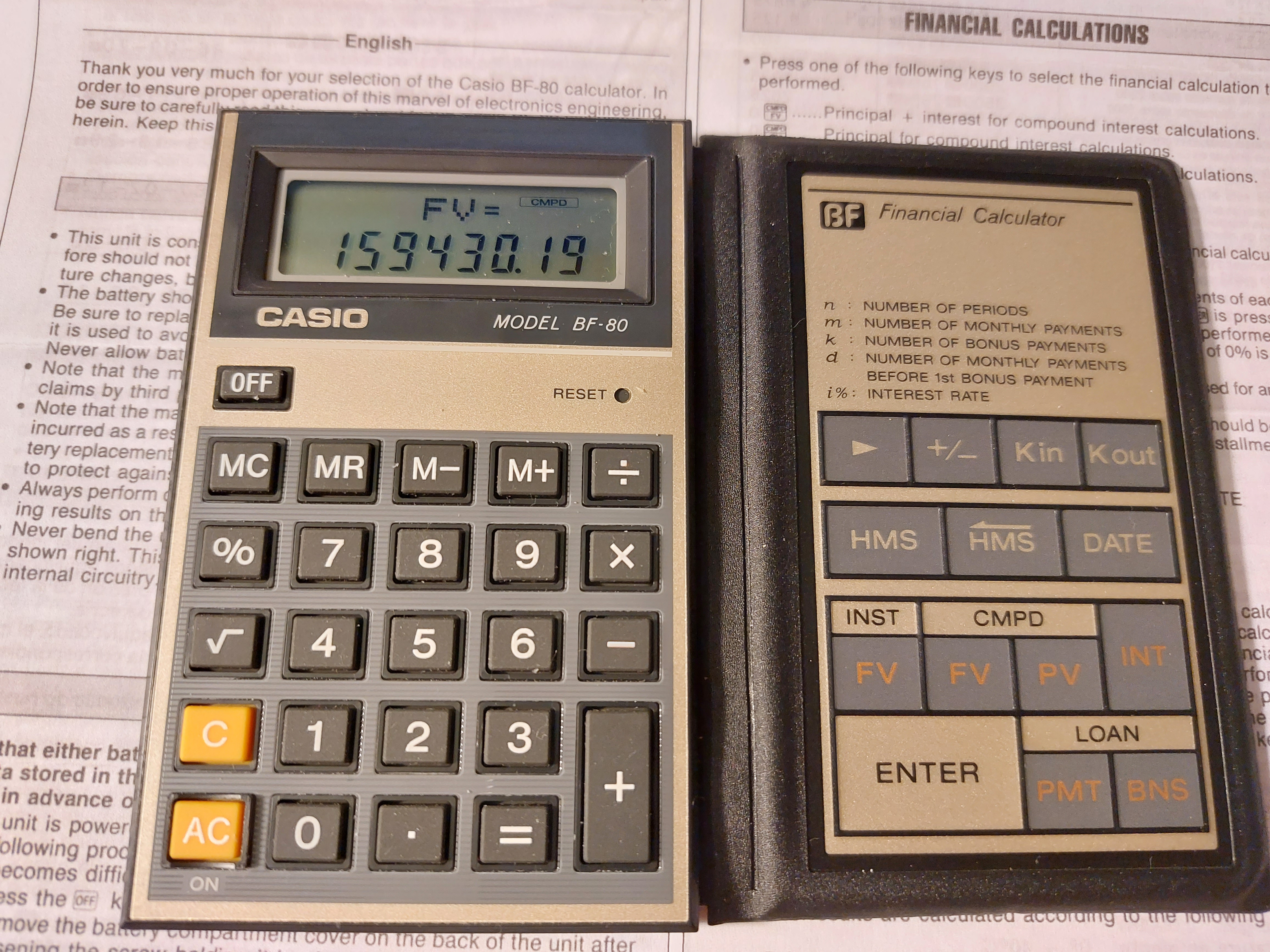
A folding calculator with easy-to-calculate finance prompts.  


Quick Facts


Model:  BF-80  (Easy Banker Financial)

Company:  Casio

Years:  1985 (production run is probably the late 1980s)

Type:  Finance

Batteries: 1 x CR-2016

Operating Modes:  Chain

Number of Registers: 2 User registers:  M,  Kin/Kout 

Display:  2 lines


Features


The BF-80 is a dual-leaf calculator.  On the left side, you have a regular four-function calculator, including memory functions, percent, and the square root function.


On the right side is where all the financial functions the BF-80 are located:


[ Kin ]/[ Kout ]:  The BF-80's other user memory register.  Unlike register M, there is no register arithmetic.


[ HMS ]/[ <HMS ]:  Convert decimal to/from hours-minutes-seconds.  Use the [ HMS ] key to enter parts of time.  


Example:  Add 3.5 hours to 11:30:00

11 [ HMS ] 30 [ HMS ] [ + ] 3.5 [ = ] 

Result:  15°0°0 (15:00:00)


[ DATE ]:  The date key leads two of my favorite functions of all time:  days between dates and calculating a future date.   The format is yy - mm - dd  (no dashes for 21st century dates).  Years are entered as four digits, from 1901 to 2099.  


For most, if not all, calculators, the cash flow convention is not used.  


INST-FV:  Calculates the future value of an annuity.  Interest rate is entered as periodical rate. Note that deposits are made at the beginning of each period (annuity due).  The INST indicator turns on. 


Example:  I pay $500 a month in an account that pays 5% interest for 10 years.

[ INST FV ]   (INST indicator is on)

PMT?  500 [ ENTER ]

i%?  5 [ ÷ ] 12 [ = ] [ ENTER ] 

n?  10 [ ÷ ]  12 [ = ] [ ENTER ]

FV= 77964.641

Pressing [ INT ] gives the interest earned:  17964.641.


CMPD-FV:  Calculates the future value of a lump sum (present value).  The CMPD indicator turns on, and INT gives the accumulated interest.


CMPD-PV:  Calculates the present value of a future lump sum (future value).  The CMPD indicator turns on, and INT gives the accumulated interest.  


Both CMPD calculations use this equation:

FV = PV * (1 + i%)^n


LOAN-PMT:  Calculates the monthly payment of a loan due at the end of each month.  The loan is to paid without a balloon payment.  The LOAN indicator turns on.


PV?:  amount to be financed

i%?:  annual interest rate

m?:  number of monthly payments


Example:  What is the monthly payment of $8,293.00 loan with 6% interest over 6 years?

[ LOAN PMT ] (LOAN indicator is on)

PV? 8293 [ ENTER ]

i%?  6 [ ENTER ] (no dividing by 12 in LOAN mode)

m? 6 [ × ] 12 [ = ] [ ENTER ] (still enter the number of months)

PMT = 137.43896

Pressing [ INT ] gives the accumulated interest paid on the loan:  -1602.6051


LOAN-BNS:  Calculates the bonus payment of a separate (side) loan given the number of bonus payments and it's cycle.


k = number of bonus payments

d = number of months to the first bonus payment

PV = bonus loan amount

i% = annual interest rate of the bonus loan


Example:  What is the payment of a bonus loan of $4,412.00 with 3% interest.  The firs bonus cycle is every 3 months from the loan date, with 15 bonus payments.

[ LOAN BNS ]  (LOAN indicator is on)

PV?  4412 [ ENTER ]

i%?  3 [ ENTER ]  (annual rate, like LOAN-PMT)

k?  15 [ ENTER ] (number of bonus payments)

d?  3 [ ENTER ] (number of months prior to the first bonus payment)

BNS = 328.21123

Pressing [ INT ] gives the accumulated interest:  -511.16857


I guess that this is for loans where payments are due every few months instead of every month.  


The Percent Key


The percent key on the BF-80 works like most Casio calculators with a percent key.   


To add a percent:  n [ × ] p [ % ] [ + ]

To subtract a percent:  n [ × ] p [ % ] [ - ]

To find a percent ratio:  part [ ÷ ] whole [ % ]

Percent change:  new [ - ] old [ % ]


A Neat Calculator - An 1980s Version of a Smartphone App 


For it's time, the BF-80 offers calculator with quick, prompting calculations for the on-the-go business and finance student or profession.  Today, in the 2020s, the calculator of this time definitely would  be a smartphone app.  


Surprisingly buying a BF-80 was incredibly reasonable.   


Coming up:


July 11 - July 15, 2022:  TI-58 and TI-59 Week

Next Regular Blog:  July 10, 2022, then  July 23, 2022


Eddie


All original content copyright, © 2011-2022.  Edward Shore.   Unauthorized use and/or unauthorized distribution for commercial purposes without express and written permission from the author is strictly prohibited.  This blog entry may be distributed for noncommercial purposes, provided that full credit is given to the author. 


Retro Review: Texas Instruments BA-Solar

Retro Review: Texas Instruments BA-Solar


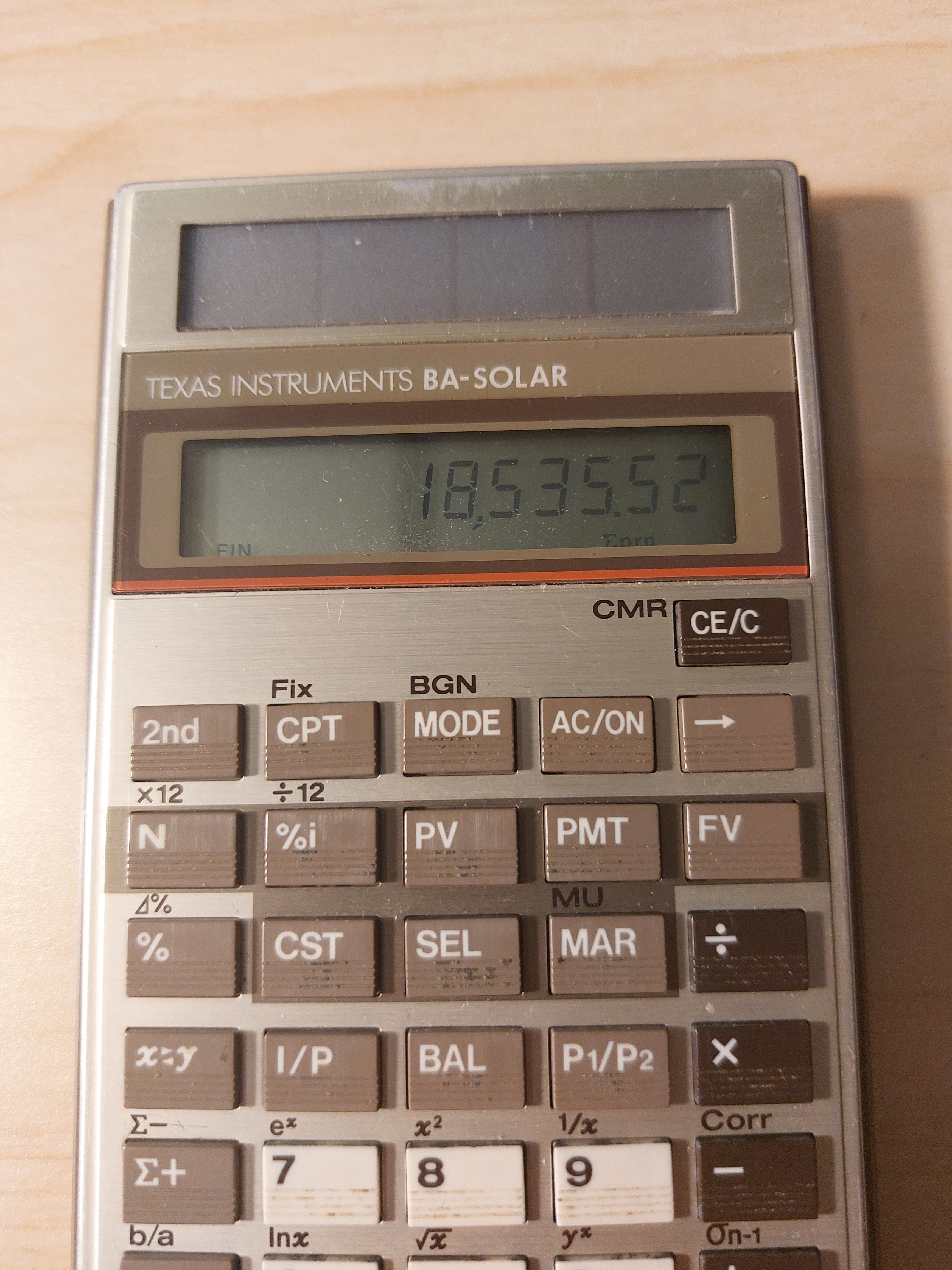
Finance + Solar + 1980s


Quick Facts


Model:  BA-Solar

Company:  Texas Instruments

Years:  1986 - 1990s; a refresh , BA-35 SOLAR was produced 1996-2000s

Type:  Finance

Batteries: Solar 

Operating Modes:  Chain

Number of Registers: 1, |MEM|

Display:  1 line, 10 digits


Features


The [ MODE ] key is used to toggle between three modes:


FIN Mode:  Time Value of Money  (FIN indicator)


N:  number of payments

%i:  periodic interest rate

PV:  present value

PMT:  payment

FV:  future value


The current cash flow convention is not used, instead the following equation is (I think) used in solving time value of money calculations: 


PV = FV *  SPPV + PMT * USPV

SPPV = single present value factor

USPV = present value annuity factor


We also have amortization functions:


BAL:  balance after any payment

I/P:  interest and principal at any payment

payment_1 P1/P2 payment_2 I/P:  cumulative interest and principal


There are ×12 and ÷12 aids, but we still have to press [ N ] and [ %i ] to register the values, they are not automatic.  


STAT Mode:  Statistics  (STAT indicator)


The BA-SOLAR (and the later BA-35 SOLAR) has both single variable statistics and linear regression.


In linear regression, use the [x<>y] key to change between x and y.   The key will also be used to switch between results.  


Prediction values can be calculated with x' and y'.


The equation used for linear regression is y = a*x + b,  a = slope, b = intercept.


Profit Mode (no indicator)


The profit mode makes the following solver available:


CST:  cost

SEL:  sell

MAR:  margin

MU:  markup


Functions Available in All Modes


Percent Calculations (%):

Add %:  x [ + ] y [ % ] [ = ]

Subtract %:  x [ - ] y [ % ] [ = ]

Multiply %:  x [ × ] y [ % ] [ = ]

Percent Ratio:  part [ ÷ ] whole [ % ] [ = ]

Percent Change:  new [ 2nd ] ( ⊿% ) old [ = ]


rate >EFF payments/year:  convert to effective rate

rate >APR payments/year:  convert to APR/nominal rate


Mathematics:

Natural logarithm and antilogarithm:  ln x, ^x

Square and square root

Power

Reciprocal


Final Thoughts


This is a great basic financial calculator.  I have both the BA-SOLAR and BA-35 SOLAR.   To be honest, I like the keyboard of the original BA-SOLAR better, the keys feel a bit more solid and responsive.  Even though they are no longer in production, the BA-SOLAR is still reasonably available on sites such as eBay and other online stores.  


Source:


Woerner, Joerg.  "Texas Instruments BA-SOLAR"  Last Updated December 5, 2001.   http://www.datamath.org/Sci/Modern/BA-SOLAR.htm   Retrieved May 19, 2022.


Eddie


All original content copyright, © 2011-2022.  Edward Shore.   Unauthorized use and/or unauthorized distribution for commercial purposes without express and written permission from the author is strictly prohibited.  This blog entry may be distributed for noncommercial purposes, provided that full credit is given to the author. 


Retro Review: Hewlett Packard HP 33S

Retro Review:   Hewlett Packard HP 33S


The calculator with the Chevron Keyboard!

Quick Facts

Model:  HP 33S
Company:  Hewlett Packard
Years:  2003-2007
Type:  Scientific
Batteries: 2 x CR-2032
Operating Modes:  RPN, ALG
Memory:  31,277 bytes
Number of Registers: 27, A-Z, i
Display:  2 stack levels

Features

*  standard scientific calculator functions: trig, logs, power, absolute value, integer and fractional part, combinations, permutations, random numbers, hyperbolic functions, and more
*  factorial function that allows real numbers;  Γ(x) = (x - 1)!
*  polar and rectangular conversion functions,  very popular (for good reason) 
*  40 scientific constants
*  8 sets of SI-US conversions
*  base conversions 
*  algebraic mode (which I don't know anyone who would use this calculator in algebraic mode, but it's there)
*  linear regression  (y = mx + b)
*  fraction display mode ( [ ←| ] [ . ] (FDISP))
*  storage and recall arithmetic

We can store equations for evaluation, solving, and integration.  

Full list of conversions:

Polar (→θ,r) - Rectangular (→y,x)
Hours (→HR) - Hours-Minutes-Seconds (→HMS)
Degrees - Radians
Kilograms - Pounds
Degrees Celsius - Degrees Fahrenheit
Centimeters - Inches
Liters - Gallons

Programming

The HP 33S has keystroke programming and the set of commands similar from the HP 32SII:  

*  INPUT var
*  VIEW var  (views the variable without putting the variable's value on the stack)
*  Subroutines and Return
*  Comparison tests between x and 0, x and y.  If the test is true, execute the next step, otherwise skip the next step
*  ISG:  Increment and skip if greater
*  DSE:  Decrement and skip if equal or less than

The HP 33S designates one register, lower case i, for indirect addressing.  The absolute integer value of i determines where storage, recall, label, subroutine, integration variable, exchange, and function designation.  Use (i) to use indirect addressing.  Indirect registers can also access statistical sums:

(i) = 27,  i 
(i) = 28,  n
(i) = 29,  Σx
(i) = 30,  Σy
(i) = 31,  Σx^2
(i) = 32,  Σy^2
(i) = 33,  Σxy

The HP 33S has 26 labels, which restrict programs to 26.  Hence, LBL A instead of LBL A0001.   At first, I didn't like the restriction, but I learned to live with it and don't mind it as much.  

Let's Talk About the Chevron Keyboard

The HP 33S is a unique calculator it's keyboard style:  the keys take a slanted quadrilateral shape, with the center column of keys taking a chevron style shape.   At the top there is a directional pad.  Hewlett Packard took a chance with the design from the standard calculator shape, and it was not a homerun.   

The beginning production of the HP 33S was not successful. Keys had bad responses, the display was not up to par, and some keys are hard to press.   It took Hewlett Packard several production runs to get the keyboard working right, which unfortunately killed the reputation of the HP 33S.  Towards the end of its run, the keyboards were fixed.

I don't mind the unique keyboard, my biggest issue was the spacing the keys where sometimes the shifted functions and alpha characters did not have much space.  This made the keyboard busy.  I also do not like the black arrows on the green and purple backgrounds on the shift keys, I use HP used a lighter font for those arrows.  

A Phoenix of Calculators  

When the HP 33S first hit the market, the calculator was disliked.  Now, it is a sought after calculator.   The original price for the 33S was about $50 US dollars, now if you want one, be prepared to pay at least $75 US dollars, sometimes triple digits.  Make sure you are buying the HP 33S from later in the run (towards 2007).  

Another factor of why the HP 33S is becoming a collector's calculator, the successor, the HP 35S, had several shortcomings such as the number of mathematical bugs and the lack of the rectangular and polar conversion functions.   The HP 33S is closer to the classic style, like the HP 32S and HP 32SII.  

I don't expect to ever be an anniversary edition of the HP 33S but it was an underrated calculator and has its place in calculator history.

Tomorrow I have a list of programs and an integer demonstration.  

Eddie

All original content copyright, © 2011-2022.  Edward Shore.   Unauthorized use and/or unauthorized distribution for commercial purposes without express and written permission from the author is strictly prohibited.  This blog entry may be distributed for noncommercial purposes, provided that full credit is given to the author. 


Backlink 9999 Traffic Super

Order Now...!!!!