Tampilkan postingan dengan label solver. Tampilkan semua postingan

Plus42 Solver: Derivatives

Plus42 Solver: Derivatives 


Introduction


The Technical Applications book for the HP 27S and HP 19B (and can apply to the HP 17B outside of trigonometry) shows the numerical first and second derivative can be calculated by the formulas:


f ' (x) = (f(x+h) - f(x-h)) / (2 * h)


f ' ' (x) = (f(x + h) - 2 * f(x) + f(x + h)) / h^2 


where h is sufficiently small, like 10^-5 to 10^-12.


Legacy Formulas vs. Plus42 Formulas 


The formulas suggested by the Technical Applications Book are:


First Derivative:


Second Derivative:


Depending on the function FX, this above can turn the above into long equations.  With the ability of user functions, this allows us to use the original definitions.


FX(X): f(x) (insert f(x)


First Derivative:


F'X=(FX(X+H)-FX(X-H))÷(2×H)


Second Derivative:


F''X=(FX(X+H)-2×FX(X)+FX(X-H))÷SQ(H)


SQ:  press by the key sequence [(shift)] (x^2)


':  (ALPHA) [ ↓ ] (PUNC) [ ↓ ] ( ' )


Note:  Radians mode 


Examples 


FIX 5 mode is set.


Example 1:


f(x) = 0.5 * cos(3*x)

x = π/4


FX(X):0.5×COS(3×X)

f'(x) ≈ -1.06066

f''(x) ≈ 3.18198


Example 2:


f(x) = (x^2 + 3*x + 5) / (4*x - 1)

x = 2


FX(X):(X^2+3×X+5)÷(4×X-1)

f'(x) ≈ -0.22449

f''(x) ≈ 0.54227


Functions with Variable Constants


It is easy to expand the user function FX to include variable constants.  For example:


f(x) = -ln(cos(√(a*x)))

Calculate the value and first derivative at x = 0.11 and a = 0.46


Attach variable constants at the end of FX:


FX(X:A):-LN(COS(SQRT(A×X)))

F'X=(FX(X+H:A)-FX(X-H:A))÷(2×H)


f(x:a) ≈ 0.02552

f'(x:a) ≈ 0.23396


The user function makes the calculating numerical derivatives easier.  


Source:


Technical Applications: Step-by-Step Solutions for Your HP-27S or HP-19B Calculator Hewlett Packard.   Edition 2.  Corvallis, OR.   November 1988.  pg. 44


Have any Halloween plans?  Wishing you a great day,


Eddie 


All original content copyright, © 2011-2022.  Edward Shore.   Unauthorized use and/or unauthorized distribution for commercial purposes without express and written permission from the author is strictly prohibited.  This blog entry may be distributed for noncommercial purposes, provided that full credit is given to the author. 


Plus42: The Solver SEQ Command

Plus42: The Solver SEQ Command


Solver SEQ Function


In the calculator app Plus42, we can evaluate a sequence of calculations to return a result.  The SEQ is also good for the FOR loop because it allows us to initialize several variables.


Syntax:

SEQ( expr1 : expr2 : expr3: ... : expr_n )


I think this is best illustrated by example.


Example 1


Calculate   f(x) = x * p ÷ t^2


where:

p = 0.01 * a^2

a = 36 *t^2 - 280


Equation:

SEQ1:F=SEQ(L(A:36×T^2-280):L(P:.01×G(A)^2))×X÷EXP(T)


The commands listed in the SEQ are:


1.  L(A:36×T^2-280):  Let A = 36 * T^2 - 280.  T is the input variable.  


2.  L(P:.01×G(A)^2)):  Let P = 0.01 * A^2;  the Get command (G) is used to keep A from the variable menu


The answer is stored in P.


Variables in calculation:  F, T, X


X = 2, T = 0.8, solve for F = 593.3698253


X = 0.3, T = 9, solve for F = 2.57253759


T = 11.1, F = 58.68, solve for X = 22.4853545434


Example 2


Calculate p = Π( n / 4, n = 1 to m)


Equation:

SEQ2: P=FOR(SEQ(L(A:1):L(N:1)):G(N)<=IP(M):L(N:G(N)+1):L(A:G(A)×(G(N)÷4)))


The commands listed in the SEQ are:


1.  L(A:1):   Let A = 1


2.  L(N:1):  Let N = 1


In this example, SEQ is in a FOR command and is used to initialize variables.   


Variables in calculation: M, P


M = 3, solve for P = 0.09375


M = 6, solve for P = 0.17578125


M = 18, solve for P = 93166.79943


If you have not checked out the Plus42 app, please check it out.  The Plus42 is an HP-42S Simulator which builds up on the Free42.   However, the Plus42 adds the solver in a style of the HP 17B and 27S, graphing commands, and units.


Thomas Okken's Plus42 page:  https://www.thomasokken.com/plus42/


Note:  Casio fx-991EX Week - September 5, 2022 to September 9, 2022 


All original content copyright, © 2011-2022.  Edward Shore.   Unauthorized use and/or unauthorized distribution for commercial purposes without express and written permission from the author is strictly prohibited.  This blog entry may be distributed for noncommercial purposes, provided that full credit is given to the author. 

TI-58/TI-59 Week: ML 13 Curve Solution

 TI-58/TI-59 Week:  ML 13 Curve Solution


Introduction


Today's blog entry highlights just one of the wonderful programs offered by Texas Instrument's Master Library.  


When the Master Library ROM program module is in the TI-58, TI-58C (for this week I will say the TI-58 to refer to both the TI-58 and TI-58C), and the TI-59, call up the Curve Solution by pressing [ 2nd ] [ LRN ] (Pgm) 13.  


The user keys are assigned as:


A:  enter the central angle in radians ( θ )

B:  enter the circle's radius ( r )

C:  enter the arc length ( s )

D:  enter the chord length ( c )

E:  solve for the sector area ( A' )


A':  solve for the central angle ( θ' )

B':  solve for the radius ( r' )

C':  solve for arc length ( s' )

D':  solve for the chord length ( c' )

E':  solve for segment area ( a' )


Enter two of the variables θ, r, s, and c and solve for the rest, and at least one of the two variables θ or r must be entered.  


Examples


Example 1:  Known: r and c


r = 10.8

c = 12.0


[ 2nd ] (Pgm) 13

10.8 [ B ]  ( r )

12.0 [ D ]  ( c )

[ 2nd ] (A'):  1.17806194 rad  ( θ )

[ 2nd ] (C'):  12.72306896  (arc length)

[ E ]:  68.70457237 (sector area)

[ 2nd ] (E'):  14.824706 (segment area)


Example 2:  Known: θ and s


[ 2nd ] (Pgm) 13 

30° angle:   30 [ ÷ ] 180 [ × ] [ 2nd ]  ( π ) [ = ] [ A ]   ( θ )

40 [ C ]  ( s )

[ 2nd ] ( B' ):  76.39437268 ( r )

[ 2nd ] ( D' ): 39.54463718 ( c )

[ E ]:  1527.887454 (sector area)

[ 2nd ] (E'):  68.86240923 (segment area)


A little detour from our usually programming the calculator ourselves, but it is sometimes more effective and efficient to take advantage of either advanced built in or mainstream modules.  Alas, we do return to programming next time,


Eddie 


All original content copyright, © 2011-2022.  Edward Shore.   Unauthorized use and/or unauthorized distribution for commercial purposes without express and written permission from the author is strictly prohibited.  This blog entry may be distributed for noncommercial purposes, provided that full credit is given to the author. 


Retro Review: Hewlett Packard HP 33S

Retro Review:   Hewlett Packard HP 33S


The calculator with the Chevron Keyboard!

Quick Facts

Model:  HP 33S
Company:  Hewlett Packard
Years:  2003-2007
Type:  Scientific
Batteries: 2 x CR-2032
Operating Modes:  RPN, ALG
Memory:  31,277 bytes
Number of Registers: 27, A-Z, i
Display:  2 stack levels

Features

*  standard scientific calculator functions: trig, logs, power, absolute value, integer and fractional part, combinations, permutations, random numbers, hyperbolic functions, and more
*  factorial function that allows real numbers;  Γ(x) = (x - 1)!
*  polar and rectangular conversion functions,  very popular (for good reason) 
*  40 scientific constants
*  8 sets of SI-US conversions
*  base conversions 
*  algebraic mode (which I don't know anyone who would use this calculator in algebraic mode, but it's there)
*  linear regression  (y = mx + b)
*  fraction display mode ( [ ←| ] [ . ] (FDISP))
*  storage and recall arithmetic

We can store equations for evaluation, solving, and integration.  

Full list of conversions:

Polar (→θ,r) - Rectangular (→y,x)
Hours (→HR) - Hours-Minutes-Seconds (→HMS)
Degrees - Radians
Kilograms - Pounds
Degrees Celsius - Degrees Fahrenheit
Centimeters - Inches
Liters - Gallons

Programming

The HP 33S has keystroke programming and the set of commands similar from the HP 32SII:  

*  INPUT var
*  VIEW var  (views the variable without putting the variable's value on the stack)
*  Subroutines and Return
*  Comparison tests between x and 0, x and y.  If the test is true, execute the next step, otherwise skip the next step
*  ISG:  Increment and skip if greater
*  DSE:  Decrement and skip if equal or less than

The HP 33S designates one register, lower case i, for indirect addressing.  The absolute integer value of i determines where storage, recall, label, subroutine, integration variable, exchange, and function designation.  Use (i) to use indirect addressing.  Indirect registers can also access statistical sums:

(i) = 27,  i 
(i) = 28,  n
(i) = 29,  Σx
(i) = 30,  Σy
(i) = 31,  Σx^2
(i) = 32,  Σy^2
(i) = 33,  Σxy

The HP 33S has 26 labels, which restrict programs to 26.  Hence, LBL A instead of LBL A0001.   At first, I didn't like the restriction, but I learned to live with it and don't mind it as much.  

Let's Talk About the Chevron Keyboard

The HP 33S is a unique calculator it's keyboard style:  the keys take a slanted quadrilateral shape, with the center column of keys taking a chevron style shape.   At the top there is a directional pad.  Hewlett Packard took a chance with the design from the standard calculator shape, and it was not a homerun.   

The beginning production of the HP 33S was not successful. Keys had bad responses, the display was not up to par, and some keys are hard to press.   It took Hewlett Packard several production runs to get the keyboard working right, which unfortunately killed the reputation of the HP 33S.  Towards the end of its run, the keyboards were fixed.

I don't mind the unique keyboard, my biggest issue was the spacing the keys where sometimes the shifted functions and alpha characters did not have much space.  This made the keyboard busy.  I also do not like the black arrows on the green and purple backgrounds on the shift keys, I use HP used a lighter font for those arrows.  

A Phoenix of Calculators  

When the HP 33S first hit the market, the calculator was disliked.  Now, it is a sought after calculator.   The original price for the 33S was about $50 US dollars, now if you want one, be prepared to pay at least $75 US dollars, sometimes triple digits.  Make sure you are buying the HP 33S from later in the run (towards 2007).  

Another factor of why the HP 33S is becoming a collector's calculator, the successor, the HP 35S, had several shortcomings such as the number of mathematical bugs and the lack of the rectangular and polar conversion functions.   The HP 33S is closer to the classic style, like the HP 32S and HP 32SII.  

I don't expect to ever be an anniversary edition of the HP 33S but it was an underrated calculator and has its place in calculator history.

Tomorrow I have a list of programs and an integer demonstration.  

Eddie

All original content copyright, © 2011-2022.  Edward Shore.   Unauthorized use and/or unauthorized distribution for commercial purposes without express and written permission from the author is strictly prohibited.  This blog entry may be distributed for noncommercial purposes, provided that full credit is given to the author. 


Plus42: Integration in Solver

Plus42: Integration in Solver


The Plus42 adds an integral function to the solver engine.


Just a Reminder:  Get the Plus42 App


Author:  Thomas Okken


App: 

Android:  $9.99

iOS:  $9.99

PC/MacOS/Linux:  Free

Donations Accepted


Link:  https://thomasokken.com/plus42/


Plus42 ∫ Syntax


∫(EXPR:VAR:LLIM:ULIM[:ACC])


EXPR:  expression to be integrated


VAR:  variable to be integrated


LLIM: lower limit


ULIM:  upper limit


ACC:  accuracy factor, an optional argument.  If ACC is omitted, then Plus42 uses the highest accuracy factor.   


Let's take a look at some of the integrals that can be used.  In this blog, all results are rounded to four decimal places (FIX 4 is the default setting of Plus42)


Example 1:  Basic Integral


I = ∫(x^2 + 1 dx, x = 0, 3)


Solver syntax:

I=∫(X^2+1:X:1:6)


This integral calculates the numerical integral of x^2 + 1 from x = 1 to x = 6.   In calculation mode, pressing ( I ) twice would definitely get the result.  


Result:  I=76.6667


Example 2:  Variable Upper Limit


I = ∫(x^3/3 - 2 dx, x = 0, A),   A is the upper limit


Solver syntax:

I=∫(X^3÷3-2:X:0:A)


Upper limit known, find the integral:

A = 4;  result:  I = 13.3333


Integral known, find the upper limit:

I = 4;  result:  A = 3.3692 (it may take have time depending on the initial guess)


I like how the solver can find both the value of the integrals and solve for the limits of the integral.


Example 3:  Variable in the Integrand


I = ∫((x^2 * (x - B)) / (B^2 + x^2) dx, x = 0, 1),  B is a variable constant


Solver syntax:

I=∫((X^2×(X-B))÷(B^2+X^2):X:0:1)


B = 1; I = -0.0612

B = 3; I = -0.0784  (I set the initial guess of I = 0)


B can be solved for if you have a good guess and you are willing to wait for the solver to work.


I = -0.07; B = 3.6139


Full Precision:  3.613900797617638382718999085866498


Eddie 


All original content copyright, © 2011-2022.  Edward Shore.   Unauthorized use and/or unauthorized distribution for commercial purposes without express and written permission from the author is strictly prohibited.  This blog entry may be distributed for noncommercial purposes, provided that full credit is given to the author. 


Plus42: The FOR Function

Plus42:  The FOR Function


About the Plus42 App


Author:  Thomas Okken


App: 

Android:  $9.99

iOS:  $9.99

PC/MacOS/Linux:  Free

Donations Accepted


Link:  https://thomasokken.com/plus42/


Please give Okken some love!   Free42 and Plus42 are both awesome apps and emulators, both emulate the HP 42S engine.  The Plus42 adds the solver of the HP 17B/19B/27S and unit conversions of the HP 48/49/50 family.   The Plus42 can also graph functions.   You can find a lot more information on the link above!


(Disclaimer:  I am not being paid.)


I am now including apps like the Plus42 in my rotation for blogs, please be on the look out for those.  


Today's blog entry will cover one of the additional solver functions for the Plus42:  FOR.


Plus42 FOR Syntax


FOR(INIT:COND:NEXT:EXPR)


INIT:  Initial commands


COND:  condition

If the condition is true:  execute EXPR (there can be more than one EXPR statements), then NEXT

If the condition is false:  the loop ends


NEXT:  next command,  this is where the counter variable is incremented or decremented


EXPR:  the main loop


Examples 


Example 1:  Add from 1 to 4.


HP 39G/Prime Code:

A:=0;

FOR K FROM 1 TO 4 DO  (STEP 1)

A:=A+K;

END;


Plus42 Equation Code:

S=FOR((L(A:0)+L(I:1))×0:G(I)≤4:L(I:G(I)+1):L(A:G(A)+G(I)))


Variables:

S = sum_final answer

A = sum

I = counter variable


Result:  S = 10


S=:   set the result to the variable S, S = A

INIT:  (L(A:0)+L(I:1))×0;  set A = 0 and I = 1

COND:  G(I)≤4;  test if I≤4; if true continue, if false exit the loop

NEXT:  L(I:G(I)+1); this happens at the end of the loop, this is like the general STEP incr/decr command

EXPR: L(A:G(A)+G(I))


The use of the Get function allows the variable to used automatically and not be displayed in the CALC menu.  


Something that threw me off is that the order of NEXT and EXPR, which the EXPR (which I think there could be more than one EXPR statements), I am used to NEXT either at the end of the FOR loop or implied (end of indentation in Python, for example).


Example 2:  Product


Calculate Π(n/4, n=1 to m) = 1/4 * 2/4 * 3/4 * ... * m/4


Plus42 Equation Code:

P=FOR((L(A:1)+L(N:1)+M)×0:G(N)≤IP(M):L(N:G(N)+1):L(A:G(A)×(G(N)÷4)))


Variables:

P = product_final answer

N = counter

M = higher limit


P=:   set the result to the variable P, P = A

INIT:  (L(A:1)+L(N:1)+M)×0; set A = 1, N = 1, ask for M

COND: G(N)≤IP(M); if N ≤ IP(M); if true continue, if false exit the loop

NEXT:  L(N:G(N)+1)

EXPR: L(A:G(A)×(G(N)÷4))


Results:

3 → M; P → 0.0938

6 → M; P → 0.1758

12 → M; P → 28.5507


Example 3:  Recursive


Given an initial condition u_0, calculate the recursion:


u_n = 2 * u_n-1 - 3


for n terms.


Plus42 Equation Code:

S=FOR((U+N+L(I:1))×0:G(I)≤N:L(I:G(I)+1):L(U:2×G(U)-3))


Variables:

S = final answer

U = recursive variable

N = number of terms


S=:  final answer

INIT:  (U+N+L(I:1))×0

COND: G(I)≤N

NEXT:  L(I:G(I)+1)

EXPR:  L(U:2×G(U)-3)


Results, enter U, N first before calculating for S:

2 → U, 3 → N; S → -5

5 → U, 2 → N; S → 11


Enjoy and hope this helps,


Eddie 


All original content copyright, © 2011-2022.  Edward Shore.   Unauthorized use and/or unauthorized distribution for commercial purposes without express and written permission from the author is strictly prohibited.  This blog entry may be distributed for noncommercial purposes, provided that full credit is given to the author. 

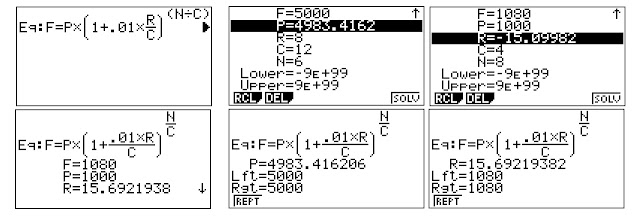
Casio fx-9750GIIIl (and fx-CG 50): Ways to Solve Equations

An expert calculator user will be able to use the tools that the calculators has to offer.  Sometimes, the solutions may be found without the need of programming.


The calculator covered today is the Casio fx-9750GIII, which is named the Casio fx-9860GIII in countries outside of the United States.  I am very confident that the solving tools are available to most recent of Casio's graphing models, including the GII series, the first Prizm, and the current color graphing calculator fx-CG 50.


Solve vs SolveN


The functions Solve and SolveN are offered in the Run-Mat mode as well as a programming commands.  


Solve works with equations involving solving for X:


Solve( f(x) = g(x), guess for X)


If g(x) is omitted, then Solve uses f(x) = 0.  Numeric solutions are returned.


SolveN allows us to solve for any variable A-Z and Θ.   Instead of an initial guess, we can provide a lower and upper bound.  SolveN returns a list of solutions within the bound.  If the lower and upper bound are omitted, then the bounds are -9.999999999E99 and 9.999999999E99.


SolveN( left = right, variable, lower bound, upper bound)


If there is no right side given, then SolveN uses left = 0.   When possible, SolveN returns exact solutions:  fractions, square roots, and multiples of π.


Neither Solve or SolveN can return complex numbered answers.  


The Equation Mode


The Equation Mode allows for three type of solvers:


F1:  Simultaneous

F2:  Polynomial

F3:  Solver


On the fx-9750GIII, access the equation mode by pressing MENU, A.   The location of the Equation mode varies depending on the calculator.  


Simultaneous


Linear equations up to 6 x 6 systems can be solved.   Entries can be either real or complex, regardless of the Set Up.  The matrix is set up like this:


[   columns of coefficients (left)   |  (right) ]


For example:

a*x1 + b*x2 = s

c*x1 + d*x2 = t


shows:

1 2 3

1 [ a b s ]

2 [ c d t  ]


The current coefficients are stored in the variable matrix Sim Coef (S∙Cof), while the current solutions can be stored in the variable Sim Result (S∙Rlt).  These are read-only variables. Both variables can be found in the [VARS],[ F6 ] ( > ), [ F3 ] (EQUA) menu. 


Polynomial


The Casio graphing calculators can solve up to 6-degree polynomials.  Depending on the Set Up, the solutions can be restricted to real numbers or return complex numbered solutions.   However, none of the of coefficients in the polynomial to be solved can be complex numbers.


The current coefficients is stored in the variable matrix Poly Coef (P∙Cof), while the current solutions can be stored in the variable Poly Result (P∙Rlt).  These are read-only variables.   Both variables can be found in the [VARS],[ F6 ] ( > ), [ F3 ] (EQUA) menu. 


Solver


The solver will allow any equations with variables A-Z and Θ.  What is nice about this mode is that all the variables will be listed and you can select one variable to solve for.   Repeated scenarios can be explored without the need to recall the SolveN function.  


Those are some of the solving tools of the Casio graphing calculators.  Hopefully you find them useful.  


If there is an interest, I can explore ways to solve applications without the need for programming.


Eddie 


All original content copyright, © 2011-2022.  Edward Shore.   Unauthorized use and/or unauthorized distribution for commercial purposes without express and written permission from the author is strictly prohibited.  This blog entry may be distributed for noncommercial purposes, provided that full credit is given to the author. 


Backlink 9999 Traffic Super

Order Now...!!!!