Tampilkan postingan dengan label linear regression. Tampilkan semua postingan

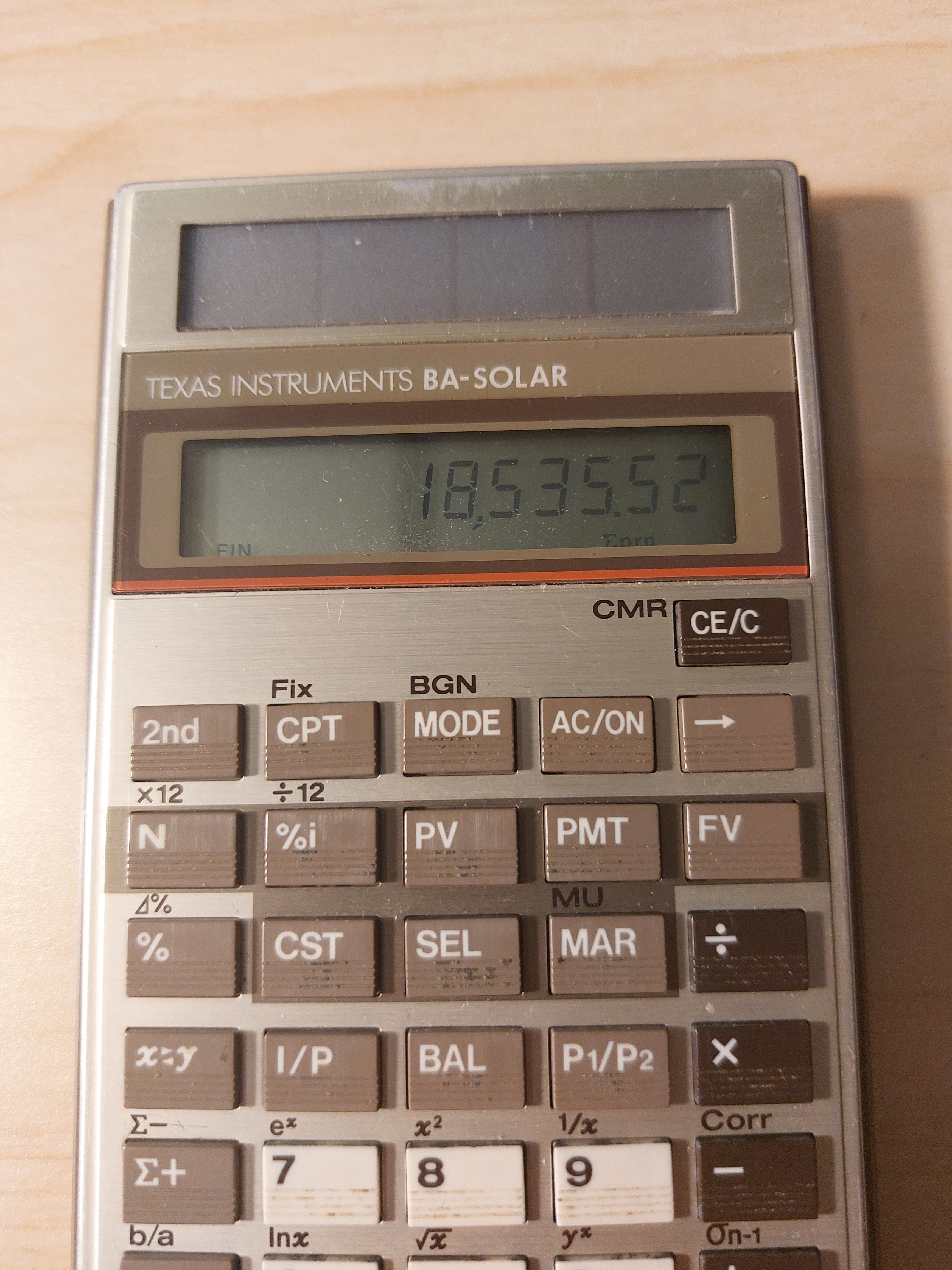
Retro Review: Texas Instruments BA-Solar

Retro Review: Texas Instruments BA-Solar


Finance + Solar + 1980s


Quick Facts


Model:  BA-Solar

Company:  Texas Instruments

Years:  1986 - 1990s; a refresh , BA-35 SOLAR was produced 1996-2000s

Type:  Finance

Batteries: Solar 

Operating Modes:  Chain

Number of Registers: 1, |MEM|

Display:  1 line, 10 digits


Features


The [ MODE ] key is used to toggle between three modes:


FIN Mode:  Time Value of Money  (FIN indicator)


N:  number of payments

%i:  periodic interest rate

PV:  present value

PMT:  payment

FV:  future value


The current cash flow convention is not used, instead the following equation is (I think) used in solving time value of money calculations: 


PV = FV *  SPPV + PMT * USPV

SPPV = single present value factor

USPV = present value annuity factor


We also have amortization functions:


BAL:  balance after any payment

I/P:  interest and principal at any payment

payment_1 P1/P2 payment_2 I/P:  cumulative interest and principal


There are ×12 and ÷12 aids, but we still have to press [ N ] and [ %i ] to register the values, they are not automatic.  


STAT Mode:  Statistics  (STAT indicator)


The BA-SOLAR (and the later BA-35 SOLAR) has both single variable statistics and linear regression.


In linear regression, use the [x<>y] key to change between x and y.   The key will also be used to switch between results.  


Prediction values can be calculated with x' and y'.


The equation used for linear regression is y = a*x + b,  a = slope, b = intercept.


Profit Mode (no indicator)


The profit mode makes the following solver available:


CST:  cost

SEL:  sell

MAR:  margin

MU:  markup


Functions Available in All Modes


Percent Calculations (%):

Add %:  x [ + ] y [ % ] [ = ]

Subtract %:  x [ - ] y [ % ] [ = ]

Multiply %:  x [ × ] y [ % ] [ = ]

Percent Ratio:  part [ ÷ ] whole [ % ] [ = ]

Percent Change:  new [ 2nd ] ( ⊿% ) old [ = ]


rate >EFF payments/year:  convert to effective rate

rate >APR payments/year:  convert to APR/nominal rate


Mathematics:

Natural logarithm and antilogarithm:  ln x, ^x

Square and square root

Power

Reciprocal


Final Thoughts


This is a great basic financial calculator.  I have both the BA-SOLAR and BA-35 SOLAR.   To be honest, I like the keyboard of the original BA-SOLAR better, the keys feel a bit more solid and responsive.  Even though they are no longer in production, the BA-SOLAR is still reasonably available on sites such as eBay and other online stores.  


Source:


Woerner, Joerg.  "Texas Instruments BA-SOLAR"  Last Updated December 5, 2001.   http://www.datamath.org/Sci/Modern/BA-SOLAR.htm   Retrieved May 19, 2022.


Eddie


All original content copyright, © 2011-2022.  Edward Shore.   Unauthorized use and/or unauthorized distribution for commercial purposes without express and written permission from the author is strictly prohibited.  This blog entry may be distributed for noncommercial purposes, provided that full credit is given to the author. 


Retro Review: Radio Shack EC-4035

Retro Review:   Radio Shack EC-4035


Quick Facts:


Model:  EC-4035

Company:  Radio Shack

Equivalent Of:  Casio fx-580

Years:  1986-1991

Type:  Scientific

Batteries: 1 x CR-2032

Operating Mode:  AOS

Memory Registers: 7  (K1 - K6, M)

Number of Digits: 10 (display), 8 in fractions, 2 digit exponents are in the top right of the display (10^xx)

Contrast Wheel


Features


*  Trigonometry, logarithmic functions

*  Base conversions with Boolean algebra

*  Engineering and Units mode

*  Single variable and linear regression  (y = A + Bx)

*  Gamma function

*  Complex numbers

*  6 constant memories (Kin/Kout) complete with storage arithmetic


The Radio Shack EC-4035 (Casio fx-580) uses an AOS (postfix) operating mode,  instead of typing expressions as they are written.


Statistics Mode


In linear regression, the equation used is y = A + Bx, where A is the y-intercept and B is the slope.  The statistics mode uses the six constant memories as follows:


K1 = Σx^2

K2 = Σx

K3 = n

K4 = Σy^2

K5 = Σy

K6 = Σxy


Gamma Function


The EC-4035 has a gamma function (Γ), which accepts all real numbers except for negative integers (-1, -2, -3, etc, because the gamma function is undefined there).  I wish this was available on more scientific functions.  


1 [a b/c] 2 [ Γ ] returns 1.772453851  (√π).  


The factorial function (x!) still only accepts non-negative integers.  


Complex Numbers


In the complex mode (Mode 3), the available functions are:


*  arithmetic (+, -, ×, ÷)

*  reciprocal (1/x)

*  argument and absolute value 

*  conjugate (x + yi → x - yi)

*  powers and roots, x^2, √


The arrow key [ → ]  and the key sequence [ SHIFT ] ( ← ) can scroll complex numbers.   Complex numbers are entered in rectangular form.  


Units and Engineering Modes


Results and calculations can be made using Engineering units and certain Electronics symbols.  All are accessed by using the [ [Sym] ] key.  The symbol each key has is located on the bottom right of the key in navy blue.   


[ MODE ] [ . ]:  Engineering Mode.  Results are shown, when applicable, with engineering symbols, for instance:


n:  nano, 10^-9

μ:  micro, 10^-6

m:  milli, 10^-3

k:  kilo, 10^3

M:  mega, 10^6

G:  giga, 10^9


The mode can be turned off by pressing [ MODE ] [ . ].


[ MODE ] [ 0 ]:  Unit Mode.  This is an enhancement to engineering mode to add electronic units:


V:  volts

A:  amperes

S:  seconds

W:  watts

F:  farads

C:  coulombs

Ω:  ohms


The electronic units can be combined with engineering units.    Also, the appropriate unit is determined in calculations.    To leave Unit Mode, go to Comp Mode by pressing [ MODE ] [ 1 ]. 


Engineering and Unit Mode are neat modes and it's really geared for electronic engineering and physics calculations.


Final Thoughts


The features of the EC-4035 gives a pretty standard advanced scientific calculators with additional features geared towards electronic engineering.   


Perhaps the next perfect calculator for electronic engineering would be a combination of the EC-4035 (fx-580), Casio fx-61f, and Calculated Industries Electronic Calc Pro (5070).  


Source:


"casio fx-580"  Voidware.  http://www.voidware.com/calcs/fx580.htm  Last Accessed April 22, 2022. 


Until next time,


Eddie


All original content copyright, © 2011-2022.  Edward Shore.   Unauthorized use and/or unauthorized distribution for commercial purposes without express and written permission from the author is strictly prohibited.  This blog entry may be distributed for noncommercial purposes, provided that full credit is given to the author. 

Retro Review: Texas Instruments TI-65

Retro Review:   Texas Instruments TI-65


Quick Facts:


Model:  TI-65 Technical Analyst 

Company:  Texas Instruments

Years:  1986-1989

Type:  Scientific, Programming

Batteries: 2 x LR44

Operating Mode:  AOS

Memory Registers:  up to 16 (0-F)

Programming Steps:  up to 100

Comes in case

Stopwatch and Timer Included


Features


The TI-65 is a late entry of the Texas Instruments and has the following features:


*  Trigonometry, Logarithms, Powers

*  Absolute value, integral and fraction part

*   DMS and HMS conversions  (degrees and hours, respectively, 360° for degrees, 24 hours)

*  Eight scientific constants

*  Eight conversions  (→ (US to SI),  INV for ← (SI to US), except Joules/calories which the order is reversed)

*  Base conversions to hexadecimal and octal only (unfortunately not binary nor any Boolean algebra)

*  Statistics

*  Linear Regression

*  Storage Arithmetic 

*  Numeric Integration

*  Programming


Scientific Constants (the values stored in the TI-65):

c:  Speed of light = 299792458 m/s

g:  Earth's gravity = 9.80665 m/s^2

me: Mass of an electron = 9.109534 * 10^-31 kg

e:  Charge of an electron = 1.6021892 * 10^-19 C

h:  Plank's Constant = 6.626176 * 10^-34 J s

k:  Boltzmann's Constant = 1.308662 * 10^-23 J/K

Na:  Avogadro's Constant = 6.022045 * 10^23 molecules/mole

R:  Gas Constant = 8.31441 J/(mole * K)


The SI units are printed with the constants on the TI-65, which I like.  


Conversions:

inches - centimeters

ounces - gallons

gallons - liters

degrees Fahrenheit - degrees Celsius

pounds per inch - Pascals

horsepower - kilowatts

Joules - calories

pounds (* foot) - Newtons


Programming, Integration, and Memory


The TI-65 has 100 programming steps that is shared with the memory register.   A register is worth seven programming steps, and the amount of memory registers available decrease as you type in steps.   Most programming steps are fully merged, hence 2nd, 3rd, and INV (indicated by a negative sign in the key code) with its key count as one step.  However, storage arithmetic takes two steps.


Maximum Number of Memory Registers vs. Maximum Amount of Steps


100 steps:  1 register (R0)

98 steps:  2 registers (R0, R1)

91 steps:  3 registers (R0, R1, R2)

84 steps:  4 registers (R0 to R3)

77 steps:  5 registers (R0 to R4)


In learn mode, the number of steps and the maximum number of registers are on display, along with the programming step.  


Memory registers can be protected by the [ 2nd ] (PUM) # sequence.  


A full set of programming commands are here:


DSZ:  decrement R# and skip if zero

INV DSZ:  decrement R# and skip if not zero

x<m:  test x < R#

INV x<m:  test x ≥ R#

x=m:  test x = R#

INV x=m:  test x ≠ R#

x>m:  test x > R#

INV x>m:  test x ≤ R#

LBL and GTO:  label (0-9, A-F, F1, F2)

F1 and F2:  user keys and labels

PAUSE:  pauses execution

SBR:  subroutine

INV SBR:  return

LIST:  display steps stored in memory


Integration:  Integration requires R0, R1, and R2 to be protected by PUM 2.  In the program, use R1 for x (you are given x in the register to start), end the function with [ = ] [ R/S ].    Calculation:  lower [ STO ] 1, upper [ STO ] 2, [ 2nd ] ( ∫dx) n [ R/S ]


Statistics:  Clear all protection first by PUM 0.   Six registers are used, and a maximum number of programming steps is 63 while statistical data is stored.  From the TI-65 manual, the following registers take the following values:


R1 = n * Σxy - Σx * Σy

R2 = n

R3 = Σy

R4 = n * Σy^2 - (Σy)^2

R5 = Σx

R6 = n * Σx^2 - (Σx)^2


Stopwatch and Timer


The TI-65, billed as a technical calculator aimed at professionals, includes a stopwatch and timer (but not a clock).  


Stopwatch:  

Press [ 3rd ] ( TUp↑) to start the stop watch.  Do this again to stop it.  


Timer:

Enter the time in hh:mm:ss  (hours:minutes:seconds) format, press [ 2nd ] ( TDn↓ ) to start the timer.   Do this again to stop it.   There are no sounds, the timer displays 00:00:00 when completed.  


You can store the timer into any available register. The store key is not required in this instance.   Recall the last time by pressing [ RCL ] [ : ].   


It may be possible to include the stopwatch and timer, however, they will not run in the background.   When the stopwatch or timer is working, the TI-65 is locked out of calculations.  Still, a nice feature.  


Closing Thoughts


I believe that the TI-65 is the penultimate calculator in the Galaxy series (the last is the TI Galaxy 67).  It's one of Texas  Instruments' most underrated calculators and production had continued into the 1990s, it could of had served as a non-graphing alternate to the TI-81.   Back in the early 1990s, graphing calculators were not as accepted in school; today, they are expected.


If you are collecting calculators, I would recommend the TI-65.  It's one of the best keystroke programming calculators Texas Instruments made since the TI 58/59, with a complete set of instructions and a decent amount of memory.  You do need a little patience because the TI-65 can be slow (especially compared to today's calculators).  The case and the sticker with helpful hints attached to it make a nice touch.  


(I don't recall the TI-67 Galaxy ever being on sale in the United States.)


Here are some TI-65 programs I posted in July 2016:

http://edspi31415.blogspot.com/2016/07/ti-65-programs-part-i-digital-root.html


http://edspi31415.blogspot.com/2016/07/ti-65-programs-part-ii-reynolds.html


http://edspi31415.blogspot.com/2016/07/ti-65-programs-part-iii-impedance-and.html


and will have more on tomorrow's post.


Sources:


Texas Instruments.  "TI-65 Technical Analyst" http://www.datamath.net/Leaflets/CL-947A_US.pdf     Flyer provided by datamath.net.  Last accessed April 10, 2022.


Texas Instruments TI-65 Technical Analyst Guidebook  1986


Toth, Viktor.  "TI-65"   rskey.org. 2022  http://www.rskey.org/ti65  Last Accessed April 29, 2022


Tschnenrechner-Sammlung, Tony   "TI-65 Galaxy"  Tony's Taschenrechner-Sammlung Calculator Collection https://www.thimet.de/CalcCollection/Calculators/TI-65/Contents.htm  Last accessed April 29, 2022


Eddie


All original content copyright, © 2011-2022.  Edward Shore.   Unauthorized use and/or unauthorized distribution for commercial purposes without express and written permission from the author is strictly prohibited.  This blog entry may be distributed for noncommercial purposes, provided that full credit is given to the author. 


Backlink 9999 Traffic Super

Order Now...!!!!